
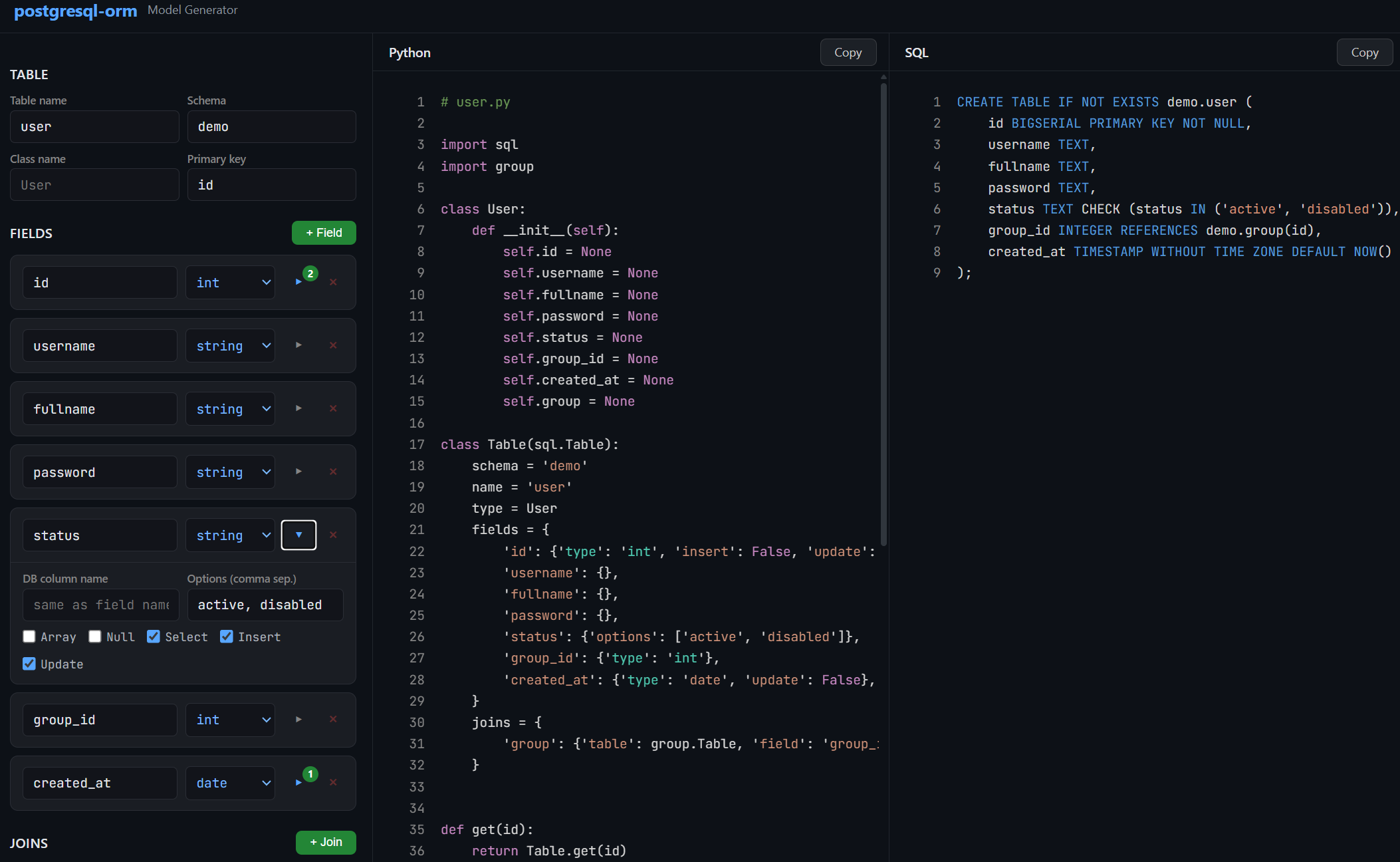
Open Interactive Model Builder — build your data class, Table model, CRUD functions, and CREATE TABLE script from an interactive configurator. No coding required to get started.
A lightweight Python ORM for PostgreSQL built on top of psycopg2. Define your tables as Python classes, and the library handles query generation, type casting, filtering, pagination, joins, and object mapping — all through clean, minimal configuration.
pip install psycopg2-binary
pip install postgresql-orm
- Quick Start
- Design Philosophy
- Database Connection
- Defining Models
- Fields
- CRUD Operations
- Querying Multiple Rows
- Joins
- Custom Queries
- Debug Logging
- Complete Example
import sql
import logging as log

# Enable debug logging to see generated SQL
log.basicConfig(level=log.DEBUG)

# Connect to PostgreSQL
sql.db = sql.Db('dbname=mydb user=postgres password=secret host=127.0.0.1 port=5432')

# Define a data class
class User:
    def __init__(self):
        self.id = None
        self.username = None
        self.email = None

# Define the model
class Users(sql.Table):
    name = 'users'
    type = User
    fields = {
        'id': {'type': 'int'},
        'username': {},
        'email': {},
    }

# Insert
user = Users.add({'username': 'john', 'email': 'john@example.com'})
print(user.id, user.username)  # 1 john

# Get by ID
user = Users.get(1)

# Update
user = Users.save(1, {'email': 'newemail@example.com'})

# Delete
Users.delete(1)

# List with filtering and pagination
result = Users.filter(page=1, limit=20, filter={'username': 'john'})
print(result.total)  # Total matching rows
for user in result.items:
print(user.username)This ORM was written with a single principle: generate the most optimal SQL possible and minimize round trips to the database.
Most ORMs treat insert, select, and join as separate operations. You insert a row, then query it back, then query its relations — that's 2-3 round trips for one logical operation. This library does it all in one query.
Every CRUD method — add, get, save, filter — produces exactly one SQL query that does everything: the write, the read-back, and all joins.
For example, when you insert a user that belongs to a group:
user = Users.add({'username': 'john', 'group_id': 1})
print(user.group.name)  # 'Manager' — already loaded, no extra query
The generated SQL uses a CTE (Common Table Expression) with RETURNING to insert the row, immediately select it back with all fields, and LEFT JOIN the related group table — all in a single statement:
WITH "users" AS (
    INSERT INTO "users" ("username", "group_id")
    VALUES ('john', '1')
    RETURNING users."id", users."username", users."group_id", users."created_at"
)
SELECT users."id", users."username", users."group_id", users."created_at",
       groups."id", groups."name"
FROM "users"
LEFT JOIN "groups" ON "groups"."id" = "users"."group_id"
The same pattern applies to save (update). You update fields and get back the full object with all its relations in one round trip:
WITH "users" AS (
    UPDATE "users" SET "status" = 'disabled'
    WHERE "users"."id" = 1
    RETURNING users."id", users."username", ...
)
SELECT users.*, groups."id", groups."name"
FROM "users"
LEFT JOIN "groups" ON "groups"."id" = "users"."group_id"When you define a join on a model, every query that touches that model automatically includes the LEFT JOIN. There is no lazy loading, no N+1 problem, and no need to remember to "include" or "eager load" relations. If the model says it has a join, the join is always there:
user = Users.get(1)       # LEFT JOIN included
user = Users.save(1, {})  # LEFT JOIN included
users = Users.all()       # LEFT JOIN included
result = Users.filter()   # LEFT JOIN included
The joined data becomes a nested object on the result. If a user has a group join, then user.group is a full Group object with all its own fields populated.
The filter method returns paginated results with a total count. Many ORMs run two queries for this — one for the rows and one for SELECT COUNT(*). This library uses PostgreSQL's window function instead:
SELECT ..., COUNT(*) OVER()
FROM "users"
WHERE ...
LIMIT 25 OFFSET 0
COUNT(*) OVER() computes the total matching rows as part of the same query that fetches the page, so pagination costs exactly one round trip.
All user-provided values go through psycopg2's parameter binding (%s placeholders). The ORM never interpolates values into SQL strings. This is handled automatically — you pass Python dicts and get safe, parameterized queries.
Configure the default database connection by assigning an sql.Db instance to sql.db:
import sql

sql.db = sql.Db('dbname=mydb user=postgres password=secret host=127.0.0.1 port=5432')
The connection string is a standard psycopg2 DSN (data source name).
By default, a pool of 20 thread-safe connections is created. You can change this:
sql.db = sql.Db('...', size=50)The connection pool is initialized lazily — the first actual query triggers pool creation. To initialize it manually, call:
sql.db.init()Under the hood, sql.db.get() acquires a connection from the pool and sql.db.put(conn) returns it. You normally don't call these directly unless you're writing custom queries.
Each model can have its own database connection. This is useful when tables live on different servers or databases:
class Users(sql.Table):
    db = sql.Db('host=10.0.0.1 dbname=core')
    name = 'users'
    fields = {}

class Logs(sql.Table):
    db = sql.Db('host=10.0.0.2 dbname=analytics')
    name = 'logs'
fields = {}A model is made of two parts: a data class (a plain Python class representing a row) and a Table subclass (the model definition that maps to the database table).
The data class is a simple Python object. Its properties correspond to the columns you want to work with:
class User:
    def __init__(self):
        self.id = None
        self.username = None
        self.email = None
        self.created_at = None
Defining properties explicitly is optional — the ORM sets attributes dynamically on the object. But having them written out makes your code much more readable and IDE-friendly.
If your __init__ accepts keyword arguments, the ORM will pass matching field values as constructor arguments. Any remaining fields are set as attributes after construction:
class User:
    def __init__(self, id=None, username=None):
        self.id = id
        self.username = username
        # 'email' will be set as an attribute after __init__
The model is a class that extends sql.Table:
class Users(sql.Table):
    name = 'users'
    type = User
    fields = {
        'id': {'type': 'int'},
        'username': {},
        'email': {},
        'created_at': {'type': 'date'},
    }
A common naming convention: the data class is singular (User) and the model is plural (Users), since the model represents the table (a collection of users).
class Users(sql.Table):
    schema = 'public'   # Schema name, default is None (which means the database default, usually 'public')
    name = 'users'      # Actual table name in the database (required)
You can set a default schema for all models:
sql.Table.schema = 'myapp'The default primary key field is 'id'. Override it if your table uses a different column:
class Profiles(sql.Table):
    id = 'user_id'  # Primary key column
    name = 'profiles'
fields = {}The fields dictionary is the core of every model. Each key is a field name, and the value is a dictionary of options describing how that field behaves.
Specify the type with the 'type' key. The default is 'string'.
| Type | Python Cast | Notes |
|---|---|---|
'string' |
str(value) |
Default type when 'type' is omitted |
'int' |
int(value) |
|
'float' |
float(value) |
|
'bool' |
bool(value) |
|
'date' |
dateutil.parser.parse(value) |
Parses date strings via python-dateutil |
'json' |
json.dumps(value) on write, json.loads(value) on read |
Stored as JSON/JSONB in PostgreSQL |
Example:
fields = {
    'id': {'type': 'int'},
    'username': {},                 # Defaults to 'string'
    'score': {'type': 'float'},
    'is_active': {'type': 'bool'},
    'created_at': {'type': 'date'},
    'metadata': {'type': 'json'},
}Here is the full list of options you can set on a field:
fields = {
    'name': {
        'type': 'string',           # Type casting (see table above)
        'field': 'actual_column',    # Map to a different database column name
        'array': True,               # PostgreSQL array column
        'options': ['a', 'b', 'c'],  # Restrict allowed values
        'encoder': some_function,    # Transform value before writing to DB
        'decoder': some_function,    # Transform value after reading from DB
        'select': True,              # Include in SELECT queries (default: True)
        'insert': True,              # Include in INSERT queries (default: True)
        'update': True,              # Include in UPDATE queries (default: True)
        'null': False,               # Allow None values (default: False)
        'keys': ['en', 'ka'],        # For JSON fields: allowed keys for ordering
    }
}By default, if a field's value is None, it is silently skipped during insert and update. If you set 'null': True, then None values are explicitly written as SQL NULL:
fields = {
    'deleted_at': {'type': 'date', 'null': True},
}

# With null: True, this sets deleted_at = NULL in the database
Users.save(1, {'deleted_at': None})

# With null: False (default), the field is ignored entirelyRestrict a field to a set of allowed values. Any value not in the list raises an InvalidValue error:
fields = {
    'status': {'options': ['active', 'disabled', 'pending']},
    'priority': {'type': 'int', 'options': [1, 2, 3, 4, 5]},
}

Users.add({'status': 'active'})    # OK
Users.add({'status': 'banned'}) # Raises InvalidValueAn encoder transforms the value before it's written to the database. A decoder transforms it after reading:
import hashlib

def md5(plain):
    return hashlib.md5(plain.encode()).hexdigest()

fields = {
    'password': {'encoder': md5},   # '123' is stored as '202cb962ac59075b964b07152d234b70'
}
The encoder runs after type casting and option validation, so the value is guaranteed to be the right type and a valid option before encoding.
A decoder example:
fields = {
    'config': {'decoder': lambda x: json.loads(x) if x else {}},
}For PostgreSQL array columns (e.g., TEXT[], INTEGER[]), set 'array': True:
fields = {
    'tags': {'array': True},               # String array
    'scores': {'type': 'int', 'array': True},  # Integer array
}

Users.add({'tags': ['python', 'postgresql']})
When inserting or updating, you must pass a Python list or tuple. The ORM converts it to PostgreSQL array syntax ({val1,val2,...}).
When filtering with where, array fields use the ANY() operator:
# Generates: %s = ANY(users."tags")
Users.all(filter={'tags': ['python']})For PostgreSQL JSON/JSONB columns:
fields = {
    'title': {
        'type': 'json',
        'keys': ['en', 'ka', 'ru'],  # Allowed keys (used for ordering)
    }
}
Values are automatically serialized with json.dumps() on write and deserialized with json.loads() on read.
The keys option is used when ordering by a JSON field — see Ordering.
When used in a where filter, JSON fields are searched with ILIKE on their text representation:
# Generates: users."title"::TEXT ILIKE '%hello%'
Users.all(filter={'title': 'hello'})You can exclude a field from specific operations:
fields = {
    'id': {'type': 'int', 'insert': False},          # Auto-generated, don't include in INSERT
    'created_at': {'type': 'date', 'update': False},  # Set once, never updated
    'internal': {'select': False},                     # Never included in SELECT results
}When your Python field name doesn't match the database column name:
fields = {
    'group_id': {'type': 'int', 'field': 'grp_id'},  # Python uses 'group_id', DB column is 'grp_id'
}All CRUD methods are class methods on your Table subclass. They handle connection management, query generation, execution, and object creation automatically.
user = Users.add({
    'username': 'john',
    'fullname': 'John Doe',
    'password': '123',
    'status': 'active',
    'group_id': 1,
})
Returns the newly created object with all fields populated — including auto-generated ones like id and created_at, and including all joined relations. After this single call, user.group.name is already available without any extra query.
The query uses a CTE with RETURNING to insert, select back, and join all related tables in one round trip:
WITH "users" AS (
    INSERT INTO "demo"."users" ("username", "fullname", "password", "status", "group_id")
    VALUES ('john', 'John Doe', '202cb962ac59075b964b07152d234b70', 'active', '1')
    RETURNING users."id", users."username", users."fullname", users."password",
              users."status", users."group_id", users."created_at"
)
SELECT users."id", users."username", ..., groups."id", groups."name"
FROM "users"
LEFT JOIN "demo"."groups" ON "groups"."id" = "users"."group_id"
Without this pattern, you would need to insert, then select, then join — three operations. Here it's one.
Unique constraint handling: If the insert violates a unique index named {table}_unique_{field}_index, the ORM raises a UniqueError with the field name, so you can handle duplicates gracefully.
user = Users.get(1)
print(user.username)     # 'john'
print(user.group.name)   # 'Manager' — loaded via LEFT JOIN in the same query
Retrieves a single row by primary key. Returns an object of the model's type class, or None if not found. All defined joins are loaded automatically — user.group is a full Group object, not just a foreign key.
The generated query:
SELECT users."id", users."username", ..., groups."id", groups."name"
FROM "demo"."users"
LEFT JOIN "demo"."groups" ON "groups"."id" = "users"."group_id"
WHERE "users"."id" = 1 AND 1=1
You can pass an additional filter:
# Get user 1, but only if status is 'active'
user = Users.get(1, filter={'status': 'active'})user = Users.save(1, {'status': 'disabled', 'password': 'newpassword'})
print(user.status) # 'disabled'
print(user.group.name) # 'Manager' — still loaded, same single queryUpdates the row with the given primary key. You only pass the fields you want to change — at least one is required. Returns the updated object with all joins populated, or None if no row matched.
Like add, this uses a CTE to update, select back, and join in a single query:
WITH "users" AS (
    UPDATE "demo"."users" SET "password" = '...', "status" = 'disabled'
    WHERE "users"."id" = 1 AND 1=1
    RETURNING users."id", users."username", users."fullname", ...
)
SELECT users."id", users."username", ..., groups."id", groups."name"
FROM "users"
LEFT JOIN "demo"."groups" ON "groups"."id" = "users"."group_id"
You update, get the full refreshed object, and load all relations — one round trip.
You can pass an additional filter to restrict which rows can be updated:
# Only update if the user's current status is 'active'
user = Users.save(1, {'status': 'disabled'}, filter={'status': 'active'})success = Users.delete(1) # Returns True if a row was deleted, False otherwiseWith a filter:
# Only delete if user belongs to a specific group
Users.delete(1, filter={'group_id': 2})Returns all matching rows as a list of objects:
users = Users.all(
    filter={'status': 'active'},
    search={'username': 'john', 'fullname': 'john'},
    order={'field': 'username', 'method': 'asc'},
    limit=50,
)
All parameters are optional. Without any arguments, Users.all() returns all rows ordered by id DESC.
Like all, but with pagination. Returns an sql.Result object instead of a plain list:
result = Users.filter(
    page=2,
    limit=25,
    filter={'status': 'active'},
    search={'username': 'j'},
    order={'field': 'username', 'method': 'asc'},
)

print(result.total)   # Total number of matching rows (across all pages)
for user in result.items:
    print(user.username)
The maximum limit is capped at 100. Pagination is done with LIMIT and OFFSET, and the total count is computed using COUNT(*) OVER() as a window function in the same query — no separate count query needed:
SELECT users."id", users."username", ..., groups."id", groups."name",
       COUNT(*) OVER()
FROM "demo"."users"
LEFT JOIN "demo"."groups" ON "groups"."id" = "users"."group_id"
WHERE (users."username" ILIKE '%j%') AND (users."status" = 'active')
ORDER BY users."username" ASC
LIMIT 25 OFFSET 25
This means listing a page of results with a total count, full text search, filtering, ordering, and joined relations all happens in a single query.
The filter parameter uses AND logic — all conditions must match:
# status = 'active' AND group_id = 1
Users.all(filter={'status': 'active', 'group_id': 1})
How filtering works depends on the field type:
| Field Type | Filter Behavior | Example SQL |
|---|---|---|
string |
ILIKE (case-insensitive partial match) |
users."username"::TEXT ILIKE '%john%' |
int, float, date |
Exact match | users."age" = 25 |
bool |
Exact match | users."is_active" = true |
options (any type) |
Exact match | users."status" = 'active' |
json |
ILIKE on text cast |
users."data"::TEXT ILIKE '%search%' |
array |
ANY() |
%s = ANY(users."tags") |
The search parameter uses OR logic — any condition matching is enough:
# username ILIKE '%j%' OR fullname ILIKE '%j%'
Users.all(search={'username': 'j', 'fullname': 'j'})
When both filter and search are used, they combine as:
WHERE (search_condition_1 OR search_condition_2) AND (filter_condition_1 AND filter_condition_2)Users.all(order={'field': 'username', 'method': 'asc'})The method must be 'asc' or 'desc' (case-insensitive). If omitted, PostgreSQL's default ordering applies.
For JSON fields, use dot notation to order by a specific key:
# ORDER BY users."title"->'en'
Products.all(order={'field': 'title.en', 'method': 'asc'})
The key must be listed in the field's 'keys' option.
For int, float, and date fields, pass a dict with 'from' and/or 'to' keys:
# id >= 10 AND id <= 100
Users.all(filter={'id': {'from': 10, 'to': 100}})

# created_at >= '2024-01-01'
Users.all(filter={'created_at': {'from': '2024-01-01'}})

# score <= 50.0
Users.all(filter={'score': {'to': 50.0}})For int, float, and date fields, pass a list to generate an IN clause:
# id IN (1, 2, 3, 5, 8)
Users.all(filter={'id': [1, 2, 3, 5, 8]})
For options fields, pass a list/tuple/set to get IN:
# status IN ('active', 'pending')
Users.all(filter={'status': ('active', 'pending')})
Joins are the heart of this ORM's efficiency. When a model defines a join, every operation on that model — get, add, save, all, filter — automatically includes a LEFT JOIN to load the related data. There is no lazy loading, no separate query, and no N+1 problem. You always get the full object graph in one round trip.
Define joins on the model using the joins dictionary. Each entry maps a name to a joined table and the local foreign key field that references it:
class Groups(sql.Table):
    name = 'groups'
    type = Group
    fields = {
        'id': {'type': 'int'},
        'name': {},
    }

class Users(sql.Table):
    name = 'users'
    type = User
    fields = {
        'id': {'type': 'int'},
        'username': {},
        'group_id': {'type': 'int'},
    }
    joins = {
        'group': {'table': Groups, 'field': 'group_id'},
    }
This tells the ORM: "users has a foreign key group_id that references the groups table. Load it as group on the result object."
Every query now includes:
LEFT JOIN "groups" ON "groups"."id" = "users"."group_id"The join name ('group') becomes an attribute on the returned object. The attribute is a full instance of the joined model's type class:
user = Users.get(1)
print(user.group_id)     # 1 — the raw foreign key
print(user.group)        # <Group object>
print(user.group.id)     # 1
print(user.group.name)   # 'Manager'
This works the same way across all operations:
# add — the returned user already has user.group loaded
user = Users.add({'username': 'jane', 'group_id': 2})
print(user.group.name)  # 'Customer'

# save — the returned user has the refreshed group
user = Users.save(1, {'group_id': 2})
print(user.group.name)  # 'Customer'

# all / filter — every user in the list has their group loaded
users = Users.all()
for u in users:
    print(u.username, u.group.name)
A model can have multiple joins. For example, if a product has both a company and a category:
class Products(sql.Table):
    name = 'products'
    type = Product
    fields = {
        'id': {'type': 'int'},
        'title': {},
        'company_id': {'type': 'int'},
        'category_id': {'type': 'int'},
    }
    joins = {
        'company': {'table': Companies, 'field': 'company_id'},
        'category': {'table': Categories, 'field': 'category_id'},
    }

product = Products.get(1)
print(product.company.name)   # 'Acme Corp'
print(product.category.name)  # 'Electronics'
Both LEFT JOINs are included in every query. One round trip, full object graph.
Pass a nested dict using the join name as the key:
# Filter: groups.id = 1
Users.all(filter={'status': 'active', 'group': {'id': 1}})
This works for both filter and search:
Users.all(
    filter={'group': {'id': 1}},
    search={'username': 'j', 'group': {'name': 'man'}},
)Use the join name as a prefix with dot notation:
# ORDER BY groups."name" ASC
Users.filter(order={'field': 'group.name', 'method': 'asc'})For queries that go beyond the built-in CRUD, use the model's utilities for query building and object creation:
import sql

db = None
try:
    db = Users.db.get()
    cursor = db.cursor()
    cursor.execute(*sql.debug(f"""
        SELECT {Users.select()}
        FROM {Users}
        WHERE {Users('username')} = %s
        AND {Users('password')} = %s
    """, ('john', md5('123'))))

    if cursor.rowcount > 0:
        user = Users.create(cursor.fetchone())
        print(user.username)
finally:
    if db:
        db.commit()
        Users.db.put(db)
What each helper does:
| Expression | Output | Description |
|---|---|---|
Users.select() |
users."id", users."username", ... |
All selectable columns, fully qualified |
str(Users) or using it in an f-string |
"demo"."users" |
Quoted schema.table reference |
Users('username') |
"users"."username" |
Quoted table.column reference |
Users.create(row) |
User object |
Converts a raw tuple from cursor.fetchone() into an object |
sql.debug(query, params) |
(query, params) |
Logs the query with colored formatting and returns the pair for cursor.execute() |
You can also run fully raw queries with sql.query():
sql.db = sql.Db('...')

result = sql.query('SELECT COUNT(*) FROM users WHERE status = %s', ['active'])
# Returns a list of tuples, or None if no rowsSet the log level to DEBUG to see every generated SQL query with colored terminal output:
import logging as log
log.basicConfig(level=log.DEBUG)
Queries are logged with syntax highlighting — keywords like SELECT, WHERE, JOIN are color-coded for readability.
To temporarily suppress query logging (useful when inserting many rows in a loop):
log.getLogger().setLevel(log.INFO)
# ... bulk operations ...
log.getLogger().setLevel(log.DEBUG)This example creates a schema with two tables, defines models, and demonstrates all major operations.
import sql
import hashlib
import json
import logging as log

log.basicConfig(level=log.DEBUG)

# --- Setup ---

sql.db = sql.Db('dbname=postgres user=postgres password=1234 host=127.0.0.1 port=5432')
sql.Table.schema = 'demo'

sql.query('CREATE SCHEMA IF NOT EXISTS demo')

sql.query("""
    CREATE TABLE IF NOT EXISTS demo.groups (
        id SMALLSERIAL PRIMARY KEY NOT NULL,
        name VARCHAR(32)
    )
""")

sql.query("""
    CREATE TABLE IF NOT EXISTS demo.users (
        id BIGSERIAL PRIMARY KEY NOT NULL,
        username VARCHAR(64) NOT NULL,
        fullname VARCHAR(64) NOT NULL,
        password CHAR(32) NOT NULL,
        status VARCHAR(8) NOT NULL,
        group_id SMALLINT REFERENCES demo.groups(id),
        created_at TIMESTAMP WITHOUT TIME ZONE DEFAULT NOW()
    )
""")

# --- Helpers ---

def md5(plain):
    return hashlib.md5(plain.encode()).hexdigest()

def pprint(obj):
    print(json.dumps(obj, indent=4, default=lambda x: x.__dict__ if hasattr(x, '__dict__') else str(x)))

# --- Data Classes ---

class Group:
    def __init__(self):
        self.id = None
        self.name = None

class User:
    def __init__(self):
        self.id = None
        self.username = None
        self.fullname = None
        self.password = None
        self.status = None
        self.group_id = None
        self.created_at = None
        self.group = None

# --- Models ---

class Groups(sql.Table):
    name = 'groups'
    type = Group
    fields = {
        'id': {'type': 'int'},
        'name': {},
    }

class Users(sql.Table):
    name = 'users'
    type = User
    fields = {
        'id': {'type': 'int'},
        'username': {},
        'fullname': {},
        'password': {'encoder': md5},
        'status': {'options': ['active', 'disabled']},
        'group_id': {'type': 'int'},
        'created_at': {'type': 'date'},
    }
    joins = {
        'group': {'table': Groups, 'field': 'group_id'},
    }

# --- Operations ---

# Create groups
manager = Groups.add({'name': 'Manager'})
customer = Groups.add({'name': 'Customer'})

# Create a user
user = Users.add({
    'username': 'john',
    'fullname': 'John Doe',
    'password': '123',
    'status': 'active',
    'group_id': manager.id,
})
pprint(user)
# user.group.name == 'Manager'

# Retrieve by ID
user = Users.get(1)

# Update
user = Users.save(1, {'status': 'disabled', 'password': 'newpass'})

# List with filters
users = Users.all(
    filter={'status': 'active', 'group': {'id': customer.id}},
    search={'username': 'j', 'fullname': 'j'},
    order={'field': 'username', 'method': 'asc'},
    limit=10,
)

# Paginated results
result = Users.filter(
    page=1,
    limit=25,
    filter={'status': 'active'},
    order={'field': 'id', 'method': 'desc'},
)
print(f"Page 1 of {result.total} total results")
for u in result.items:
    print(u.username, u.group.name)

# Delete
Users.delete(1)

# Custom query
db = None
try:
    db = Users.db.get()
    cursor = db.cursor()
    cursor.execute(*sql.debug(f"""
        SELECT {Users.select()}
        FROM {Users}
        WHERE {Users('username')} = %s
    """, ['john']))
    if cursor.rowcount > 0:
        user = Users.create(cursor.fetchone())
        pprint(user)
finally:
    if db:
        db.commit()
Users.db.put(db)This ORM generates PostgreSQL-specific SQL by design. Every core feature relies on capabilities that other databases either lack or implement differently. This is an intentional trade-off: by targeting one database, every query is optimal.
Here's what breaks if you try to use the same patterns with MySQL or SQLite:
| Feature | Used In | PostgreSQL | MySQL | SQLite |
|---|---|---|---|---|
RETURNING |
add, save (CTE single-query pattern) | ✓ | ✗ | ✓ (3.35+) |
CTE (WITH ... AS) |
add, save | ✓ | ✓ (8.0+) | ✓ (3.8.3+) |
COUNT(*) OVER() |
filter (pagination without count query) | ✓ | ✓ (8.0+) | ✓ (3.25+) |
ILIKE |
where (case-insensitive string search) | ✓ | ✗ | ✗ |
ANY() |
where (array field filtering) | ✓ | ✗ | ✗ |
Array types (TEXT[], INT[]) |
array fields | ✓ | ✗ | ✗ |
JSONB + ::TEXT cast |
where (JSON search), order (JSON keys) | ✓ | ✗ | ✗ |
psycopg2 connection driver |
all database access | ✓ | ✗ | ✗ |
MySQL is missing RETURNING, which kills the core single-query architecture. Without it, insert and update would require separate SELECT queries — exactly the multi-query pattern this ORM was built to eliminate. MariaDB (10.5+) does support RETURNING, making it theoretically closer to compatibility.
SQLite has RETURNING and CTEs, but lacks ILIKE, ANY(), array types, and JSONB — so filtering, searching, and array/JSON fields would all break. It also uses a completely different connection library.
The psycopg2 driver dependency means neither MySQL nor SQLite can even connect without rewriting the Db class. This is PostgreSQL-native by design, not by accident.
| Exception | When |
|---|---|
sql.MissingInput |
No data passed to insert/update, or None passed to where |
sql.MissingField |
Order field is empty or missing |
sql.MissingConfig |
JSON field missing keys when ordering by a JSON key |
sql.UnknownField |
Field name not found in the model's fields dict |
sql.UniqueError |
Insert or update violates a unique constraint |
sql.InvalidValue |
Value not in options, or invalid order method |
sql.InvalidDate |
Date string couldn't be parsed |
sql.InvalidInt |
Value couldn't be cast to int |
sql.InvalidFloat |
Value couldn't be cast to float |