This project contains a basic clock widget created using Tkinter. This widget can be configured to start up when the system boots in Windows operating systems.



Win+HShow/Hide the widget window
(Win + H shortcut conflicts with Windows applications in some cases.)
Win+TShow/Hide the widget windowAlt+MChange the clock modeAlt+0Reset chronometerAlt+1Start chronometer
- Download or clone the project to your computer.
- Open a terminal or command prompt and run the following command to install the required libraries:
tkinterpywin32keyboardctypes
How to install:
pip install -r requirements.txtThe requirements.txt file contains a directory. That directory needs to be transferred to the command line.
# Example: If your 'requirements.txt' file is located at 'C:\users\pc\downloads\Desktop-Clock-Widget\'
cd C:\users\pc\downloads\Desktop-Clock-Widget
pip install -r requirements.txt- Move the
.exefile from the project folder to the startup folder or create a shortcut.
- Right-click in the project folder to create a shortcut for the
.exefile. (Or you can move theexefile directly.) - Press
Win + R, typeshell:startup, and press Enter. This opens the Windows startup folder. - Right-click in the startup folder and select "Paste shortcut" to add the shortcut.
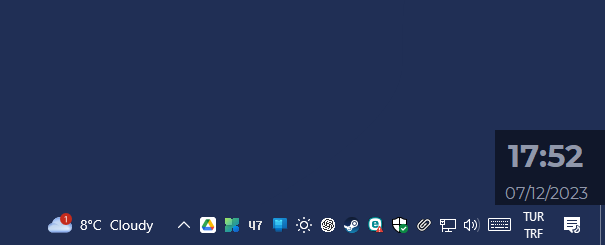
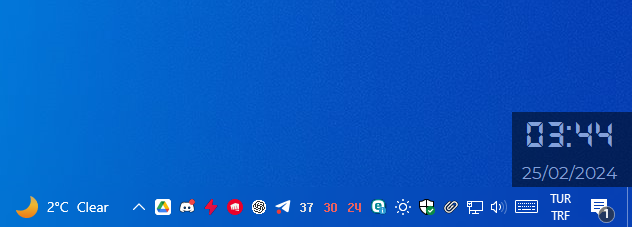
It will look like this;
Clock:
Chronometer:
Warning
Montserrat and DS-DIGITAL font has been used for the clock. If this font is not installed on your computer, it may be displayed in a different font.

This project is licensed under the GPL-3.0 License. For more information, see the LICENSE file.
If you want to make any modification on these source codes while keeping new codes not protected by GPL-3.0, please contact me for a sublicense instead.
Develooped by ZNKL© 07/12/2023